Transform CAD Models into
Photorealistic Images
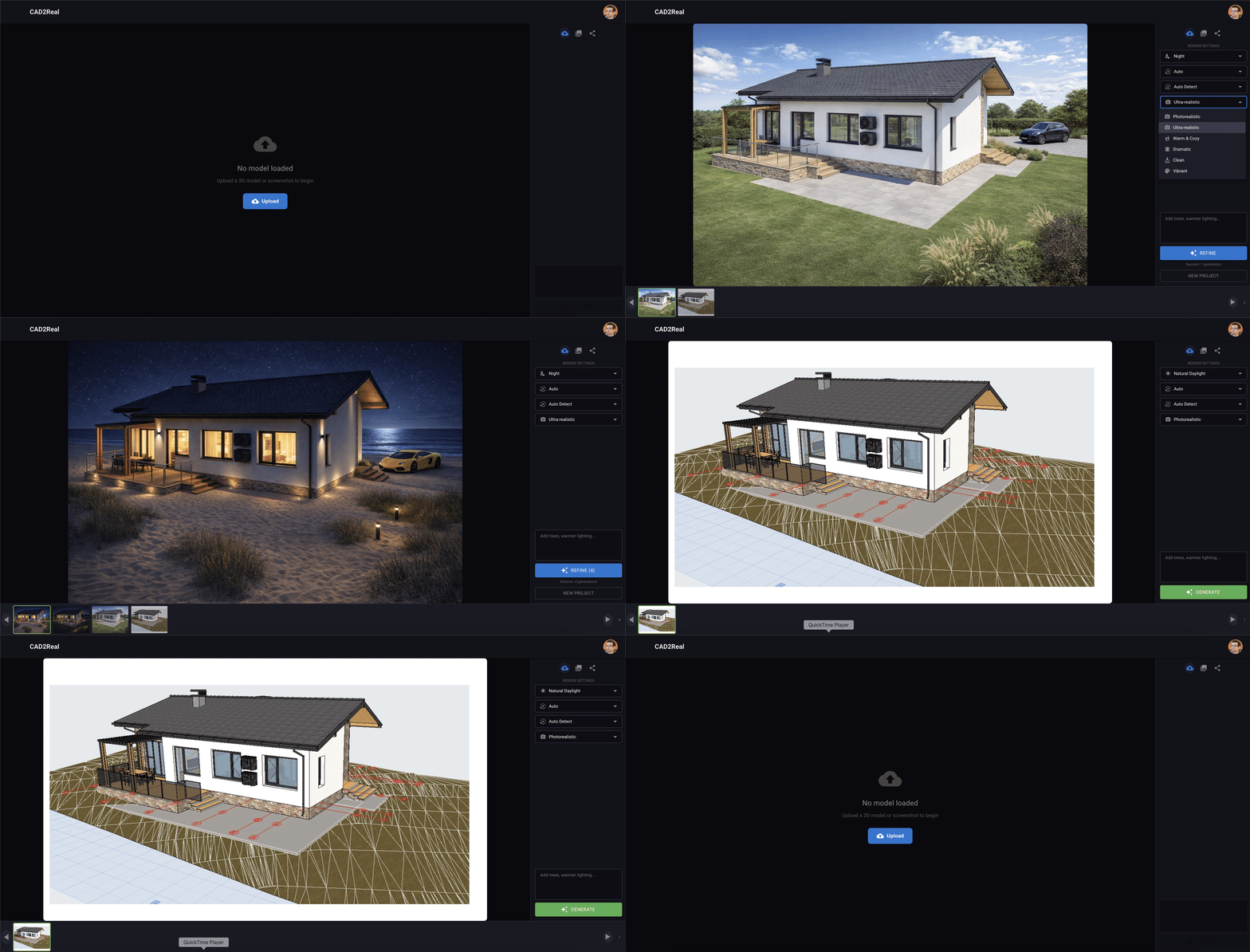
Upload CAD screenshots (PNG) or 3D models (OBJ, glTF, FBX) and watch AI transform them into photorealistic visualizations.
Sign in with Google to start creating
How it Works
Get photorealistic renders in 3 simple steps
Upload Your CAD
Take a screenshot of your CAD model or upload OBJ, glTF, FBX files directly from AutoCAD, ArchiCAD, SketchUp, or any 3D software.
AI Generates Render
Our AI analyzes your model and generates photorealistic visualization with smart defaults - materials, lighting, landscaping.
Refine & Export
Not perfect? Simply describe changes: "warmer lighting", "wood facade", "add trees" - AI refines until you're satisfied.
Instant Transformation
Upload any CAD screenshot or 3D model and get photorealistic renders in 30-60 seconds. No complex setup required.
Style Presets
Choose from lighting conditions, architectural styles, and moods. Golden hour, night scenes, modern or rustic - you control the look.
Iterative Refinement
Not perfect on first try? Simply describe changes: "add trees", "warmer lighting", "change roof color" - and watch AI refine your vision.
Choose Your Plan
Start free, scale as you grow
Ready to Transform Your CAD?
Join architects worldwide using AI for photorealistic renders
Start Free Today